Character Creator Overview
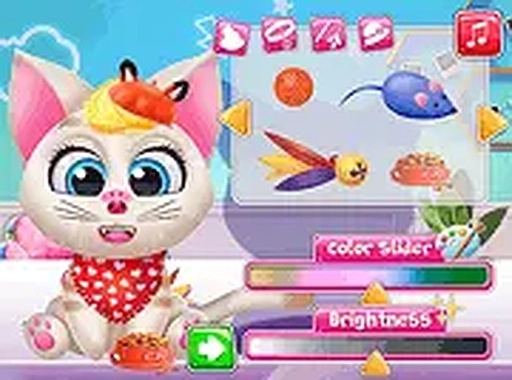
Feline Style Studio focuses on giving players the tools to build a cat character that reflects their personal taste. The process starts with selecting from several face shapes, nose designs, and eye colors. Each choice changes the cat's overall expression and personality. This system encourages experimentation, as even small adjustments can lead to a completely different look. The interface is straightforward, allowing players to see changes in real time without any complicated menus.
Accessory Selection & Mixing
After establishing the base features, players can browse a collection of accessories. Hats, bows, and glasses are available in multiple colors and styles. The game does not restrict how many items can be used at once, so players can layer accessories for a more elaborate appearance. Color coordination plays a role, as matching or contrasting shades can make the final design stand out. This part of the experience rewards creativity and patience.
Photo & Play Mode
Once the character is complete, a snapshot feature lets players save their creation as an image. This is useful for sharing or simply keeping a record of different designs. After saving, the game transitions into a play mode where the cat character responds to simple interactions. Players can pet, play, or watch their cat move around the screen. This mode adds a gentle reward for the design work done earlier.
Platform & Accessibility
Feline Style Studio runs smoothly on both desktop computers and mobile devices. The layout adapts to different screen sizes without losing functionality. A full-screen option is available for those who prefer a more focused view. The game loads quickly and does not require any downloads or installations, making it easy to start playing within seconds. These technical choices ensure that the experience remains accessible to a wide audience.




Comments
0 comments