Building a Cat from Scratch
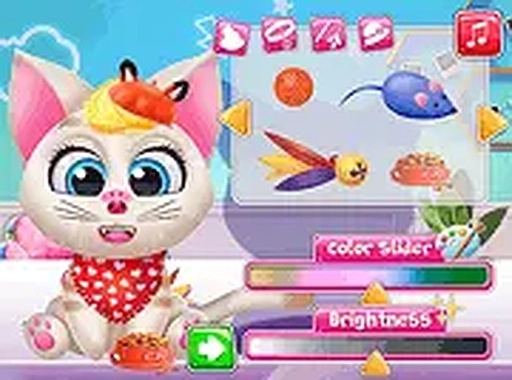
Feline Style Studio opens with a character creator built around three core choices: face shape, nose design, and eye color. These decisions are not cosmetic afterthoughts. Changing the face shape alters the cat's silhouette, while eye color and nose design shift the overall expression. The interface updates in real time, so you see each adjustment immediately without digging through menus. That immediacy encourages trying combinations you might otherwise skip.
Layering Accessories Without Limits
Once the base cat is set, the accessory menu opens up. Hats, bows, and glasses come in multiple colors and styles, and the game places no cap on how many items you can wear at once. This is where color coordination matters: matching shades create a unified look, while contrasting ones make specific pieces pop. Because there is no restriction on quantity, the real constraint is your own patience and taste. The system rewards slow, deliberate mixing rather than quick random clicks.
Snapshot and Play Mode
When the design feels finished, a snapshot tool saves the cat as an image. You can keep a record of different versions or share them. After saving, the game switches to a play mode where the cat responds to simple interactions. You can pet it, play with it, or just watch it move around the screen. This mode functions as a light reward for the design work rather than a separate challenge.
Desktop and Mobile Access
Feline Style Studio runs in a browser on both desktop and mobile. The layout adapts to different screen sizes without losing functionality, and a full-screen option is available for a more focused view. The game loads quickly and requires no downloads or installations, so you can start creating within seconds. That technical simplicity keeps the experience open to a wide range of players, including those on shared or limited devices.






Comments
0 comments