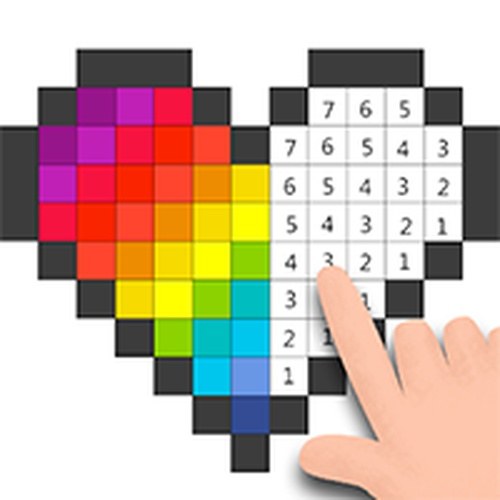
The Grid and Color System
At its core, Numbered Pixel Art Studio operates on a simple premise: each image is broken into a grid of small squares, each marked with a number. A color key on the screen shows which number corresponds to which hue. Players select a numbered square and tap or click to fill it with the correct color. This process, repeated across the entire grid, gradually assembles a larger picture. The system is designed for clarity, making it easy for anyone to pick up and start creating without confusion.
Image Library and Variety
The game includes a collection of images that span from basic patterns to more complex scenes. Beginners can start with simpler designs that require fewer squares and colors, while those seeking a longer session can choose detailed artwork. This range ensures that players can find something that matches their mood and available time. The library is curated to offer a mix of subjects, from nature themes to abstract compositions, keeping the experience fresh.
Controls and Interaction
Controls are built for both touchscreens and traditional mouse input. The interface responds smoothly to taps and clicks, with a zoom function that lets players focus on tight areas for precise coloring. This feature is particularly helpful when working on intricate sections of a design. The game also automatically saves progress, allowing users to step away and return to an unfinished piece later without losing their work. Offline functionality means no internet connection is needed after the initial setup.
Mindful Coloring Approach
Numbered Pixel Art Studio emphasizes a relaxed pace. There are no timers, scores, or competitive elements. The activity is structured to encourage focus and patience, with the reward being the gradual emergence of a completed image. Players can work methodically, filling all squares of one color before moving to the next, or approach the grid in a freeform manner. The lack of pressure makes it suitable for unwinding after a busy day or as a quiet hobby.
Progress Tracking and Sharing
As squares are filled, the game tracks completion percentage for each image. Finished artwork can be saved to the device's gallery, giving players a tangible result of their effort. This feature allows for sharing completed pieces with friends or family, adding a social element to what is otherwise a solitary activity. The saved images serve as a portfolio of personal creations over time.







Comments
0 comments