Placing Pixels on an Endless Canvas
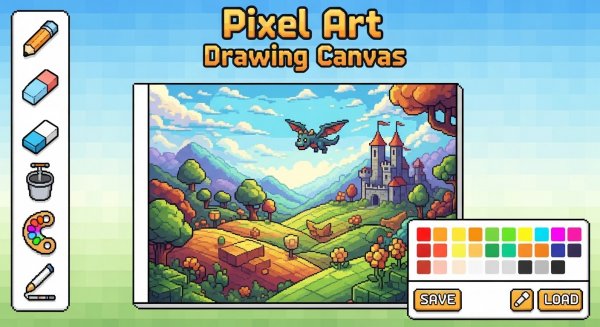
The core activity in Pixel Art Drawing Canvas Game is straightforward: select a color from the palette, pick the pencil tool, and click or tap anywhere on the infinite canvas to place a single pixel. That one action, repeated, forms every image you make. Because the canvas never runs out of space, you can spread out multiple drawings, work on a large scene piece by piece, or keep a visual log of ideas without starting a new file. The eraser removes pixels you no longer want, so corrections stay local and precise.
Navigating and Refining Your Work
Panning by dragging lets you move across the canvas, while zooming in or out changes how much detail you see. Zoom in to place pixels accurately along a curve or edge; zoom out to judge whether a figure reads clearly at a distance. Pixel size and spacing can be adjusted, which changes the visual texture of your art—smaller pixels suit intricate icons, while larger ones give a chunkier, more graphic look. These controls are the main way you shape style beyond color choice.
Exporting and Practical Use
When a drawing is finished, you can export it as a PNG image to save or share. That makes the game useful as a lightweight sketch tool, not just a pastime. The toolset is intentionally minimal, so the learning curve stays low, but the infinite canvas and adjustable pixel settings give experienced digital artists room to work on elaborate pieces. The game suits anyone who wants a quiet, low-pressure way to make pixel art without complex software.








Comments
0 comments